Two receipts from the same shop can end up with almost the same name. Before adding a date or a number, open them and check what each receipt is for. The name should help you tell them apart when you need them again.
Choose one group to work on, such as printer receipts or book club notes. Leave the rest of your folders alone while you decide what belongs in the name. A pattern that suits meeting notes may be awkward for a home inventory you keep updating.
AI-generated editorial still life. These blank papers do not show personal documents or actual transactions.
Start with the clue you will remember
If you would look for the meeting date, put it near the beginning. If you would search for "home inventory," start with those words. Use a description you will recognize later: "printer receipt" says more than "document."
Keep the wording consistent within that group. Switching between several abbreviations makes you remember a second set of names before you can find the files.
Harvard Medical School's naming guidance suggests choosing useful identifying information and ordering it around how you search. Its examples concern research data. The personal-file examples below are TidyNot's own fictional examples.
Give the date a clear meaning
For meeting notes, the date can mean the day of the meeting. On a receipt, it can mean the transaction date printed inside. A photograph's date and the day you downloaded it may be different.
Check the contents before assigning a date. If the relevant date is unknown, leave it out until you can establish it. Adding today's date just because you are renaming the file changes what the name appears to tell you.
The examples use YYYY-MM-DD, so 2026-10-10 means October 10, 2026. Keeping the same order and digit widths makes the date portion consistent. The order an app displays still depends on its sorting settings and the rest of the name.
An ongoing list can keep its dates inside the document. home-inventory_v01.xlsx may be enough if the topic is how you usually find it.
Use a version when you keep a revision
Add v01, v02 and so on when they identify versions you deliberately retain. A known third revision can be v03. Choose enough digits for that group and keep the width consistent.
A sequence number on a photograph means something different. In the examples below, 001 and 002 identify separate images from the same day. They are not two edits of one photograph.
Use "approved" only when that decision has happened. A filename cannot establish that someone reviewed the contents, and changing "draft" to "final" does not tell you whether another copy exists.
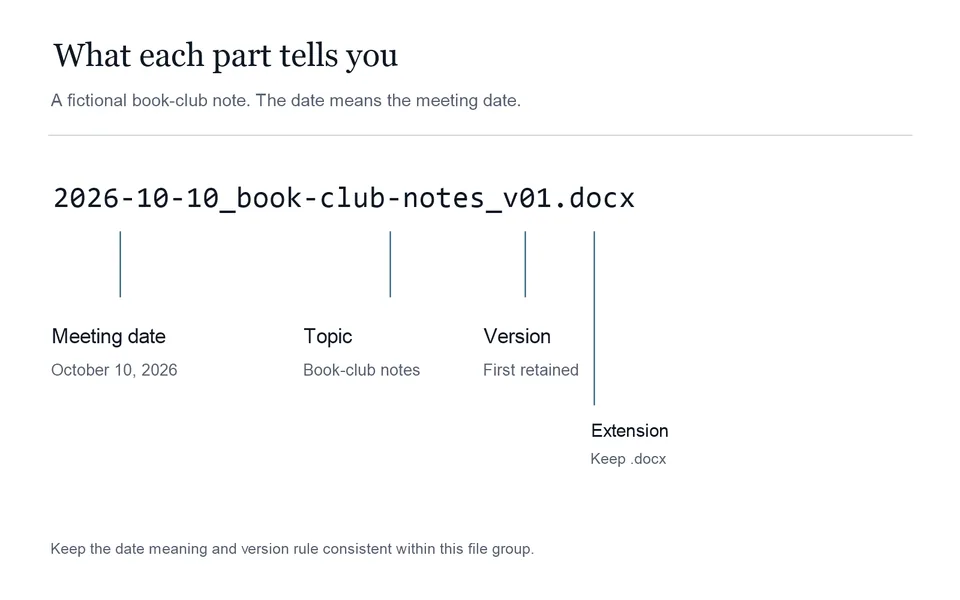
Filename example from this guide. Keep the date and version meanings consistent within the group.
Eight examples to adapt
The dates, revisions and approval in this table belong to fictional situations. The file extensions have been kept intact.
Situation | Example filename | What the name means |
|---|---|---|
Notes from a book club meeting |
| The meeting was on October 10; this is the first retained version. |
A printer receipt |
| October 8 is the transaction date. |
A Chicago trip plan |
| November 3 is the planned trip's start date. |
A home inventory updated over time |
| The topic is the main clue; the filename has no date. |
The third balcony layout proposal |
| This is a known third revision. |
One balcony photograph |
| The date is the shooting date; 001 identifies the photograph. |
Another photograph from that day |
| 002 identifies a different image. |
An approved second version of a flyer |
| Approval happened before the label was added. |
These examples use underscores between elements and hyphens within descriptions. You can choose another separator; keep the meaning and order clear within the group.
Check a matching name before you overwrite anything
Suppose the two receipts are different transactions from the same shop on the same day. A useful detail from their contents may distinguish them. You could also use 2026-10-08_shop-receipt_01.pdf and 2026-10-08_shop-receipt_02.pdf, provided you record what those numbers identify.
A matching proposed name does not prove that two files have the same contents. Open them before deciding whether either is a duplicate. Avoid putting sensitive transaction information into a name that other people can see.
Keep the extension, such as .pdf or .jpg, when renaming. Changing the extension is not a way to convert the file to a different format.
Microsoft's Windows naming reference documents reserved characters and names, Unicode support and case-related rules. Do not use uppercase versus lowercase as your only distinction. Check the rules of the actual system or service you use; the Windows reference does not describe every cloud service.
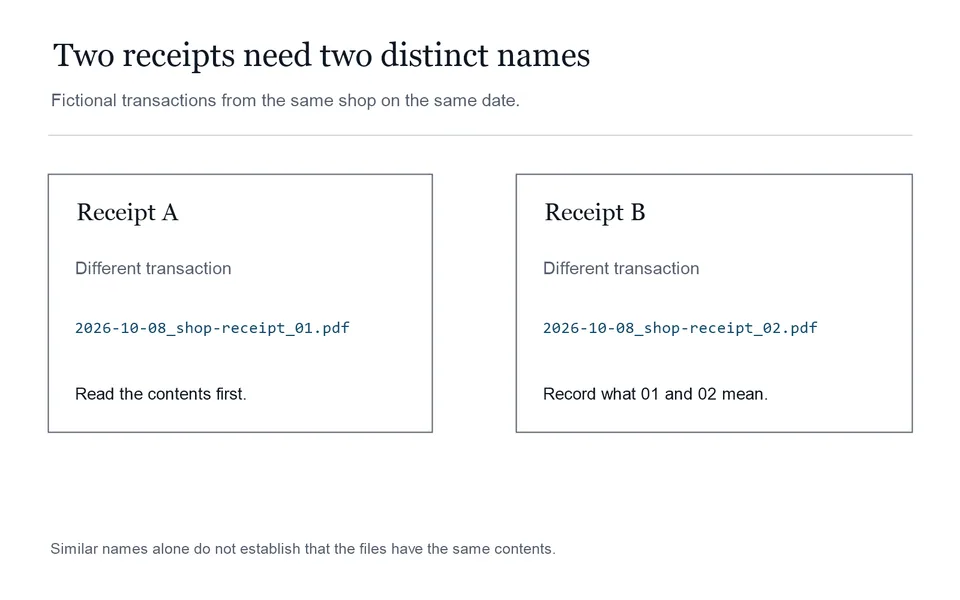
Different fictional transactions need distinct names. Read the contents before deciding whether files are duplicates.
Leave a small rule beside the files
Write down the group covered, the order of the elements and what any date means. For the book club notes, that could be: "Meeting date, topic, retained version. Use the date the meeting happened."
Try the convention on a few copies in a separate folder, or start with new files. Check that the names remain distinct and that the original extensions are intact before extending it to older material. Leave application-managed files and shared files with known references alone until you understand what depends on their names.
Try it with your own information
Draft a naming rule before renaming files
Try the rule on three sample names first. This worksheet does not rename or upload files.
An invented worked example
Use this scenario to see how the decisions fit together, then replace its details with your own observations.
Incoming: scan.pdf. Proposed: 2026-11-09_bicycle-receipt_01.pdf. The date means purchase date only if the receipt establishes it; otherwise leave the date out.
Incoming: meeting-notes-final-final.docx. Proposed: garden-meeting-notes_v03.docx. The version is a revision, not the third meeting.
Collision: two files would receive the same name. Stop and compare their contents; a naming rule does not authorize overwriting.
No account needed. Open the worksheet, enter your own notes, then download a text copy. You can also download it blank to complete elsewhere.
Open and download your worksheet
Sources and examples
The linked Harvard and Microsoft pages were checked on October 19, 2026 UTC, October 20 in Korea. This guide's examples are editorial suggestions; they are not a software compatibility test or a measured claim about time saved.
Evidence and scope
1. Harvard Medical School: File Naming Conventions
Claim covered: Choose identifying details around how you retrieve files
Harvard recommends defining a file group and choosing useful metadata and its order.
Harvard Medical School: File Naming Conventions. Research-data guidance from the US; adapted for personal files. Checked: .
The fictional household filenames are TidyNot examples, not Harvard examples.
2. Microsoft: Naming Files, Paths, and Namespaces
Claim covered: Check the rules of the actual file system
Microsoft documents Windows naming restrictions and warns against assuming case sensitivity.
Microsoft: Naming Files, Paths, and Namespaces. Windows; not a universal rule for every cloud service. Checked: .
This reference does not establish compatibility with every app or storage service.
3. Editorial application
Claim covered: The filename table is an editable example
The dates and versions in the table are fictional. Choose a convention appropriate to your own files.
TidyNot editorial suggestion. English edition; adapt to the actual home and item. Checked: .
No measured time saving or tested household outcome is claimed.